SSH Certificate Authority (SSH CA)
Sign in once with your company identity provider and sshs3 hands you a short-lived OpenSSH user certificate. There are no long-lived keys to distribute, rotate or revoke on your servers: they trust the CA, and the certificate expires on its own. sshs3 works with Smallstep Step-CA and HashiCorp Vault / OpenBao, and the private key is either generated in memory for each login or stays on your smartcard.
1. How It Works
You authenticate with an OpenID Connect (OIDC) identity provider such as Keycloak, Okta, Google Workspace or Microsoft Entra ID. The browser sign-in uses the authorization code flow with PKCE and returns to a loopback address that only sshs3 listens on.
| Step | What happens | Where it runs |
|---|---|---|
| 1 | Sign-in in your default browser | Identity provider |
| 2 | The ID token is exchanged for a certificate | CA |
| 3 | The certificate is used by terminals, SFTP and tunnels that opt in | sshs3 and the system ssh |
| 4 | Renewed before it expires, or you sign in again | sshs3 |
The CA decides the lifetime and the principals. The certificate lifetime comes from the CA (the Vault / OpenBao role ttl, or the Step-CA provisioner's SSH user duration). Default Principals is a request; the CA grants what its policy allows.
2. Quick Start
- Prepare your identity provider and the CA (section 3 and 4). This is done once by an administrator.
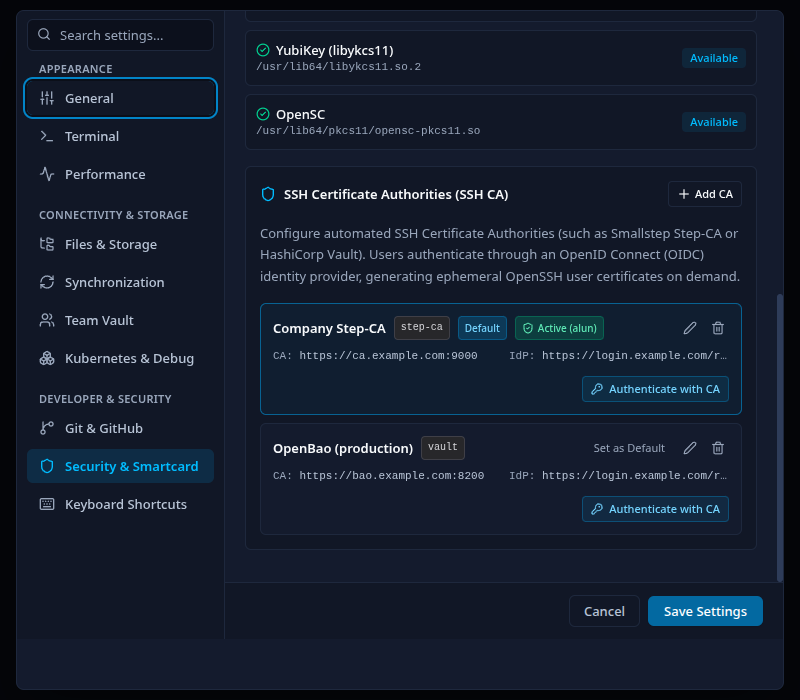
- Open Settings → Security & Smartcard, scroll to SSH Certificate Authorities (SSH CA) and click Add CA.
- Fill in the CA and the identity provider (section 5), click Save Configuration, and save the settings dialog.
- Click Authenticate with CA on the new entry. Your browser opens; sign in. The entry shows Active (your name).
- In a connection profile, set Authentication to SSH Agent and tick Use active SSH Certificate Authority session.
- Open the connection. The Shield icon in the top toolbar is green while the certificate is valid.
3. Prepare the Identity Provider
Create an OIDC client for sshs3 with these properties:
| Setting | Value |
|---|---|
| Client type | Public client, authorization code flow with PKCE (S256). sshs3 never sends a client secret. |
| Redirect URI | http://127.0.0.1:<port>/callback. The port is chosen at random for every login, so the provider has to accept any port on the loopback address (RFC 8252). The IPv6 form http://[::1]:<port>/callback is used only if IPv4 loopback is unavailable. |
| Scopes | openid profile email |
| Client ID | The value you enter as OIDC Client ID in sshs3. It must match what the CA expects. |
| Issuer | The base URL that serves /.well-known/openid-configuration. This is the OIDC Issuer URL. |
A confidential client does not work. If your provider requires a client secret for the token exchange, the sign-in fails with OIDC token exchange failed. Create a separate public client for sshs3.
4. Prepare the CA and the Servers
4.1 Step-CA
Add an OIDC provisioner whose client ID is the one you gave sshs3, and make sure SSH certificates are enabled on the CA:
step ca provisioner add keycloak --type oidc \
  --client-id sshs3 \
  --configuration-endpoint https://keycloak.example.com/realms/sshca/.well-known/openid-configuration \
  --domain example.com
Your step version may also ask for --client-secret; sshs3 never sends one. sshs3 sends the ID token to POST /1.0/ssh/sign as the one-time token, with the certificate type user and any Default Principals you configured. The provisioner's own listenAddress and client secret are only used by Smallstep's CLI; sshs3 runs its own sign-in. Without requested principals, Step-CA derives them from the email claim of the token (for carl@example.com: carl and carl@example.com). Templates can add more, for example from a groups claim.
4.2 Vault / OpenBao
sshs3 logs in to the JWT auth method with the ID token, signs the public key with the SSH secrets engine, and then revokes its own short-lived token. The commands below use bao; with HashiCorp Vault use vault.
# 1. JWT auth method: trust the identity provider, one role for sshs3 users
bao auth enable jwt
bao write auth/jwt/config oidc_discovery_url="https://keycloak.example.com/realms/sshca"
bao write auth/jwt/role/sshs3 role_type=jwt user_claim=preferred_username \
    bound_audiences=sshs3 token_policies=sshs3-sign

# 2. SSH secrets engine as a user CA
bao secrets enable -path=ssh-client-signer ssh
bao write ssh-client-signer/config/ca generate_signing_key=true
bao write ssh-client-signer/roles/client -<<'EOH'
{
  "key_type": "ca",
  "allow_user_certificates": true,
  "allowed_users": "*",
  "default_extensions": { "permit-pty": "" },
  "ttl": "30m"
}
EOH

# 3. Policy that lets the sshs3 role sign with that SSH role
bao policy write sshs3-sign - <<'EOH'
path "ssh-client-signer/sign/client" { capabilities = ["create", "update"] }
EOH
In sshs3, select OpenBao / HashiCorp Vault and enter the mount names and roles (section 5). A requested principal must be allowed by the SSH role's allowed_users. The requested Default Principals are sent as valid_principals, and the SSH role's ttl sets how long the certificate is valid.
4.3 Your servers
Servers only need to trust the CA's public key. Print it from the CA (Step-CA: step ssh config --roots; OpenBao: bao read -field=public_key ssh-client-signer/config/ca), save it on the server, for example as /etc/ssh/ca.pub, and add it to sshd_config:
TrustedUserCAKeys /etc/ssh/ca.pubBy default a certificate is accepted for any principal that equals the login name. To map principals to accounts yourself, use AuthorizedPrincipalsFile (see sshd_config(5)). No per-user authorized_keys entries are needed.
5. Configure sshs3
Open Settings → Security & Smartcard and click Add CA. You can define several CAs; Set as Default chooses the one that Log In with SSH CA in the toolbar uses.
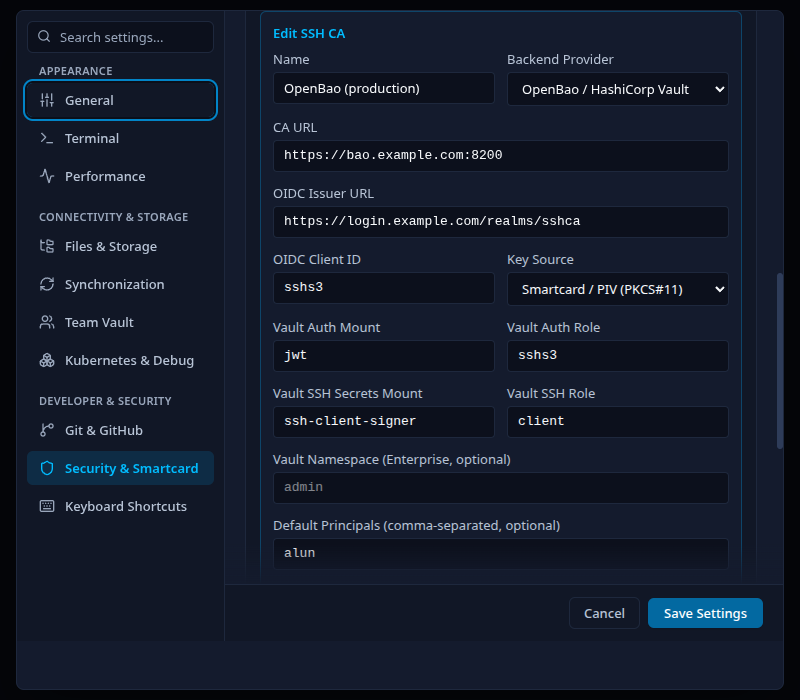
| Field | Meaning |
|---|---|
| Name | Label shown in the list. |
| Backend Provider | Smallstep (step-ca) or OpenBao / HashiCorp Vault. |
| CA URL | Base URL of the CA, for example https://ca.example.com:9000. A missing scheme is treated as https://. |
| OIDC Issuer URL | The identity provider's issuer, for example https://keycloak.example.com/realms/sshca. |
| OIDC Client ID | The public client from section 3. |
| Key Source | Ephemeral in-memory key (Ed25519) or Smartcard / PIV (PKCS#11) (section 7). |
| Vault Auth Mount (Vault only) | JWT auth mount. Default jwt. |
| Vault Auth Role (Vault only) | JWT auth role. Default default. |
| Vault SSH Secrets Mount (Vault only) | SSH engine mount. Default ssh. |
| Vault SSH Role (Vault only) | SSH signing role. Defaults to the auth role if empty, then client. |
| Vault Namespace (Vault only) | Enterprise namespace, optional. |
| Default Principals | Comma-separated principals to request, optional. |
| Custom Root CA Certificate | PEM of a private root CA that signs the CA and identity provider, optional. Blank means the system trust store. |
Authenticate with CA on an entry runs the full sign-in for that CA and reports Successfully authenticated as <name>! Certificate active. or the error. It is a real login, not a dry run.
Only https, except on loopback. sshs3 refuses http:// for the identity provider and CA unless the issuer or CA address is a loopback address (localhost, 127.x.x.x, [::1]). That makes local test setups possible without opening the door to plain-text token traffic.
6. Daily Use
The status badge
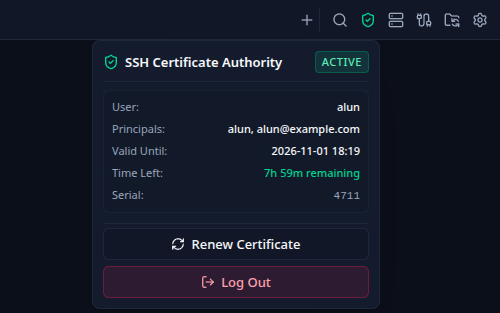
Click the Shield icon in the top toolbar, or focus it and press Enter. Press Escape to close the popup.
| Element | What it shows |
|---|---|
| Active / Inactive | Whether a valid certificate is loaded. |
| User, Principals | The identity and the principals the CA granted. |
| Valid Until | Expiry as yyyy-mm-dd HH:mm. |
| Time Left | Countdown; amber below two minutes, red when expired. |
| Serial | The certificate serial number. |
| Log In with SSH CA | Starts a sign-in with the default CA (inactive state). |
| Renew Certificate | Renews now (active state). |
| Log Out | Removes the certificate from the agent and ends the session. |
Connection profiles
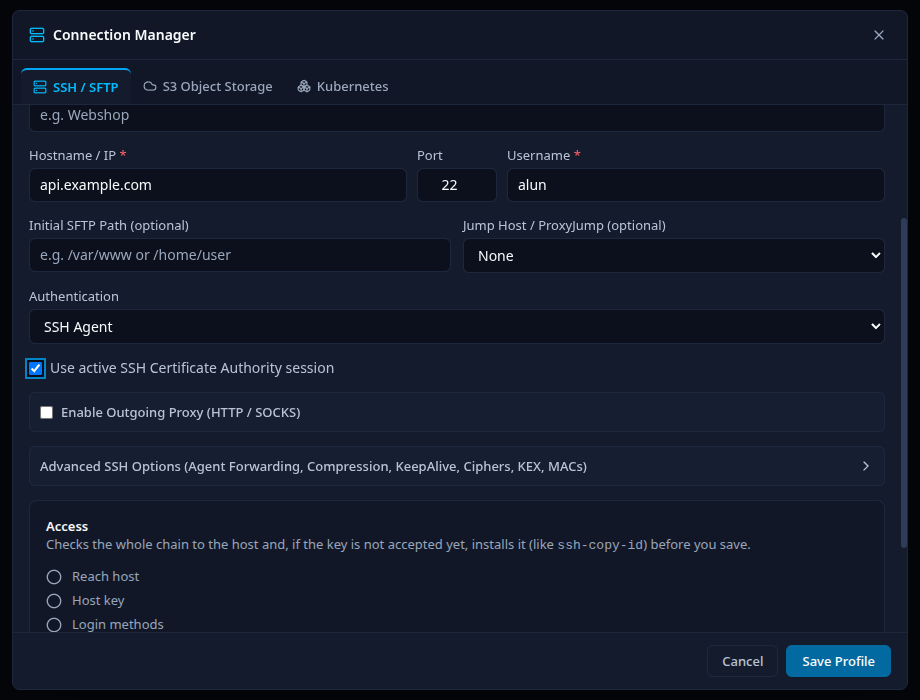
Set Authentication to SSH Agent and tick Use active SSH Certificate Authority session. Terminals, SFTP and file-manager connections, SSH tunnels and Test connection then use the active certificate. When no certificate is active, sign in first; the profile does not trigger a sign-in by itself.
Renewal
- Automatic: if the identity provider issues a refresh token, sshs3 renews the certificate about 60 seconds before it expires. It does this silently and never opens a browser by itself. With the smartcard key source the card has to be unlocked: if you locked it, sshs3 asks for the PIN again. If the silent renewal fails, the certificate runs out and the badge shows Inactive.
- Manual: Renew Certificate tries a silent refresh first and falls back to a browser sign-in if that fails.
- Log Out also cancels a sign-in that is still waiting in the browser.
- Restarting sshs3 ends the session; sign in again.
7. Key Sources
| Key Source | Private key | How the certificate is used |
|---|---|---|
| Ephemeral in-memory key (Ed25519) | Generated in memory for every login and never written to disk. | Private key and certificate are added to the app agent with a lifetime that ends with the certificate. |
| Smartcard / PIV (PKCS#11) | Stays on the card or token (the PIV authentication key, slot 9A, on PIV cards such as a YubiKey). | The card's public key is signed by the CA. The certificate is written to a 0600 file in the app's runtime directory and passed to ssh with -o CertificateFile; the connection is limited to that card's key. |
The smartcard source works with any PKCS#11 smartcard that exposes an authentication key, not only YubiKeys. sshs3 asks for the card's PIN when you sign in.
The smartcard key source unlocks the card for your other profiles under the Global policy: The key source loads the card into AppAgent, the same agent the Global (App Lifetime) PIN policy uses. The PIN you entered for SSH CA then also covers every profile that uses this card, until you click Lock All Now or quit sshs3. Logging out of SSH CA does not lock the card. Under Always Prompt and Once Per Terminal Connection your PKCS#11 profiles keep their own prompts. See Security, Hardware Keys & Smartcards for the PIN policies.
8. Security Model
sshs3 checks every certificate before it uses it, and keeps tokens out of storage:
| Protection | Detail |
|---|---|
| Sign-in | Authorization code flow with PKCE (S256), a random state and nonce. The ID token must carry the same nonce, and a different or missing one aborts the login before anything is sent to the CA. |
| Loopback receiver | Listens on 127.0.0.1 (or ::1) only, accepts one callback, checks the Host header, and ignores answers with a wrong state. |
| Transport | https required, certificates verified against the system store or your Custom Root CA Certificate. Redirects are not followed, so tokens are not forwarded elsewhere. |
| Certificate checks | It must be a user certificate, carry at least one principal, be inside its validity window, and be issued for the exact key sshs3 asked the CA to sign. |
| Nothing sensitive on disk | Identity tokens, refresh tokens and the ephemeral private key live in memory only. The PIV certificate file contains the public certificate. |
| Cancel and logout | Log Out aborts running CA requests and removes the certificate from the agent and the certificate file. |
Technical Architecture: Where Things Live
SshCaService owns the session, installs the certificate and schedules renewal. oidcFlow runs the browser sign-in and token refresh, and an operation queue serialises login, renewal and logout. The Step-CA and Vault providers only perform the signing call. Terminals and SFTP receive the agent socket and, for smartcards, the certificate file through the same preparation step as other agent-based profiles.
9. Troubleshooting & Diagnostics
| Symptom / Error | Probable Root Cause | Corrective Action |
|---|---|---|
No SSH CA configuration provided or configured in settings | No CA is saved. | Add one under Settings → Security & Smartcard → SSH CA and save the settings. |
Failed to fetch OIDC discovery configuration … (HTTP …) | Wrong OIDC Issuer URL, or the provider is unreachable. | Open <issuer>/.well-known/openid-configuration in a browser; use the exact issuer including the realm path. |
Only https URLs are allowed | The issuer or CA is http:// and not a loopback address. | Use https, or run a local test CA on 127.0.0.1. |
Timed out waiting for the browser sign-in … | The browser sign-in was not finished within two minutes, or the redirect was blocked. | Try again; check that the provider allows http://127.0.0.1:<port>/callback for the client. |
OIDC token exchange failed: … | The client is confidential, or the redirect URI is not allowed. | Use a public client with PKCE; allow loopback redirects with any port. |
OIDC id_token nonce does not match the sign-in request | The provider does not return the nonce it was sent. | Use a provider or client configuration that returns the nonce claim in the ID token. |
Step-CA certificate signing failed: … | The provisioner rejects the token (client ID, domain or SSH disabled). | Match the provisioner's client ID with OIDC Client ID; check domains and that SSH is enabled. |
Vault OIDC login failed: … | The JWT role rejects the token. | Check bound_audiences, user_claim and oidc_discovery_url; match Vault Auth Mount and Vault Auth Role. |
Vault SSH key signing failed: … | The token's policy or the SSH role does not allow the request. | Allow create, update on <mount>/sign/<role>; check allowed_users for the principals. |
SSH CA issued invalid certificate: … | The CA returned a host certificate, no principals, an expired certificate, or one for another key. | Fix the CA role or provisioner; the message names the reason. |
No smartcard detected … | The smartcard is not inserted, or no PKCS#11 module is available. | Insert the card and install a module such as opensc or libykcs11. |
Login succeeds but the server answers Permission denied | The server does not trust the CA, or no granted principal matches the login name. | Check TrustedUserCAKeys, then compare the badge's Principals with the account (AuthorizedPrincipalsFile). Use ssh -v to see the certificate being offered. |
Silent SSH CA renewal failed; sign in again before the certificate expires (log) | The refresh token was rejected or expired. | Click Renew Certificate or Log In with SSH CA. |
| Smartcard profiles no longer ask for the PIN after the login | The card was loaded into the shared agent under the Global policy. | Click Lock All Now, or use Once Per Terminal Connection or Always Prompt. |