Security, Hardware Keys & Smartcards
Security and cryptographic isolation form the foundation of sshs3. The application is engineered around the principles of Zero Private Key Extraction, strict memory sandboxing, and Zero Trust identity verification.
1. Zero Private Key Extraction Architecture
A critical security principle of sshs3 is that private cryptographic keys are never extracted, loaded, or exposed inside JavaScript, Node.js, or Chromium heaps:
| Credential Type | Cryptographic Isolation Mechanism | Private Key Exposure |
|---|---|---|
| FIDO2 / WebAuthn Keys | Signing occurs entirely on the hardware token chip (YubiKey 5). | Physically impossible to export |
| PKCS#11 Smartcards | Keys reside in the Secure Element of the physical card (PIV, CAC, SITHS). Delegated via system modules (p11-kit, libykcs11, opensc). | Physically impossible to export |
| Software Disk Keys | Loaded and parsed strictly by your OS's native OpenSSH client process. | Zero exposure in app runtime |
| Saved Passwords & Secrets | Encrypted via Electron safeStorage using the OS keyring (DPAPI on Windows, Secret Service/libsecret on Linux). | Encrypted at rest |
Keyring Unavailable Warning: In headless Linux environments or minimal sessions lacking a D-Bus Secret Service, sshs3 surfaces an active alert: "Credential encryption unavailable". In this mode, sensitive credentials are held in volatile memory only and are never written unencrypted to disk.
2. Visual Touch-Presence Banner
Authenticating with a FIDO2 hardware token (ed25519-sk, ecdsa-sk) requires physical user presence:
┌────────────────────────────────────────────────────────────────────────┐
│ 🔑 Touch your security key to authenticate...                          │
└────────────────────────────────────────────────────────────────────────┘
In standard command-line tools, terminal sessions appear to hang while the user is unaware that a security key is flashing under their desk. sshs3 detects OpenSSH user presence events in real time and illuminates an animated banner the exact millisecond user touch is requested, dismissing it immediately once presence is registered.
Good to know
- If the token is not touched within OpenSSH's timeout window (typically 30 seconds), the connection aborts.
- FIDO2/U2F keys require OS-level driver support.
Technical Internals: Stderr Pattern Matching & IPC Dispatch
SSHPtyManager and OpenSshSftpProcess inspect process stderr streams in real time for OpenSSH prompt markers: Confirm user presence for key... Upon detection, an IPC_CHANNELS.PRESENCE_PROMPT event dispatches to React to mount the visual touch banner. Once the signature completes or OpenSSH exits, IPC_CHANNELS.PRESENCE_CLEAR dismisses the banner automatically.
3. Ephemeral PIN Caching Policies & AppAgent
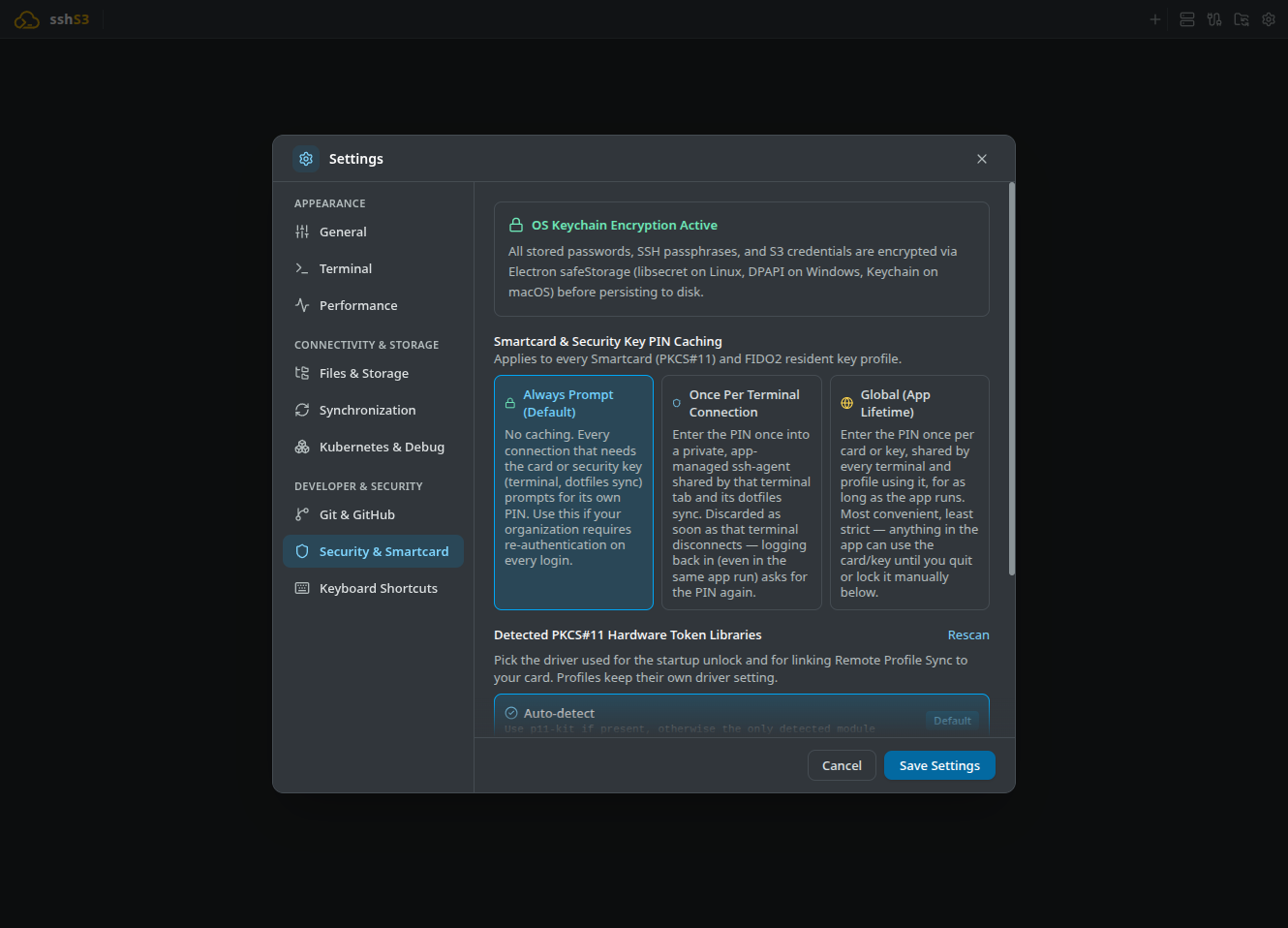
To protect smartcards and PIN-protected hardware keys against unauthorized physical access while preventing user fatigue, sshs3 provides three distinct policies under Settings → Security & Smartcard:
| Policy | PIN Lifetime | Best Used For |
|---|---|---|
| Always Prompt (Default) | Cleared from memory immediately after each handshake. | Maximum security; strict organizational zero-cache compliance. |
| Once Per Terminal Connection | Cached inside a private, per-connection ssh-agent. Destroyed when the terminal or SFTP tab disconnects. | Multi-tab sessions on high-security workstations. |
| Global (App Lifetime) | Maintained in memory inside the single app-wide AppAgent socket until locked or application exit. | Full Single Sign-On across all app tabs and external CLI terminals. |
Global (App Lifetime) & External Terminal Superpowers
Under Global PIN caching, sshs3 unlocks seamless Single Sign-On:
- Stable Socket: The agent listens on a dedicated Unix socket (
$XDG_RUNTIME_DIR/sshs3/agent.sockwith0700permissions). - Lock / Unlock Action: Click Lock All Now in the top toolbar to flush all loaded keys immediately (
ssh-add -D). Click Unlock Now to reload keys upon PIN entry. - FIDO2 verify-required PIN Caching: For FIDO2 keys requiring PIN + touch per signature, the PIN entered during unlock is cached in process memory (never on disk) so subsequent connections only require a physical touch. If a touch signature fails, the cached PIN is invalidated immediately to prevent authenticator lockouts.
- Local Shells & External CLI: External terminal windows, VS Code, and local tabs automatically receive the
SSH_AUTH_SOCKenvironment variable. Furthermore, sshs3 injects a temporary local-only block into your~/.ssh/config:
# BEGIN sshs3-agent (local only -- regenerated by sshs3 while cards are unlocked, never synced)
  Host prod-db
      IdentityAgent /run/user/1000/sshs3/agent.sock
      IdentityFile <public key file of the unlocked card>
      IdentitiesOnly yes
      PKCS11Provider none
  # END sshs3-agent
When sshs3 shuts down, the block is cleaned up and the socket destroyed.
Card or Key Not Plugged In
sshs3 checks that the smartcard or security key is present before it asks for a PIN. Unlock at startup stays silent when nothing is plugged in. When a terminal, an SFTP connection, Remote Profile Sync or a Team Vault needs the token, an Insert your smartcard / security key dialog waits for it and gives way to the PIN dialog as soon as the token is detected. Cancel (or Esc) stops the operation without asking for a PIN.
Detecting a FIDO2 key works on Linux only. On macOS the PIN dialog appears as before, and a key connected over NFC or Bluetooth is not detected.
PIN caching is strictly memory-only and is wiped on reboot or application exit. If the application crashes, stale sockets are cleaned up automatically on the next launch.
Security Architecture: Slot Separation (Authentication 9A vs. Signing 9C)
PIV smartcards typically expose multiple slots: an authentication slot (9A) and a digital signature slot (9C). Standard OpenSSH ssh-add -s loads all exposed slots indiscriminately. sshs3 inspects the card's X.509 certificates first:
- Only certificates bearing the
digitalSignatureKey Usage andclientAuthExtended Key Usage are offered for SSH authentication. - Dedicated signing keys (with
nonRepudiation) are excluded and removed from the active agent to prevent accidental key exposure during SSH handshakes.
Technical Architecture: Secure PIN Delivery via AskpassServer
AskpassServer (src/main/smartcard/AskpassServer.ts) runs an isolated Unix domain socket with strict 0700 filesystem permissions. When OpenSSH executes with SSH_ASKPASS_REQUIRE=force, helper scripts communicate directly with AskpassServer using process memory IPC. Plaintext PINs are never written to disk or configuration files.
4. Troubleshooting & Diagnostics
| Symptom / Error | Probable Root Cause | Corrective Action |
|---|---|---|
Smartcard module not found | PKCS#11 provider library missing | Install p11-kit (sudo apt install p11-kit or sudo dnf install p11-kit). |
PIN locked / CKR_PIN_LOCKED | Incorrect PIN entered too many times | Card is locked. Unlock using PUK code via your provider tool (e.g. Net iD Client). |
| Touch banner does not disappear | YubiKey timed out or missed touch | Tap the key immediately when flashing. Verify key is securely inserted into USB port. |
| Local shell asks for PIN despite Global Caching | Tab was opened before card was unlocked | Open a fresh tab, and ensure Settings → Terminal → Local Terminal SSH Agent is set to Auto. |