Live Telemetry & Diagnostics Bar
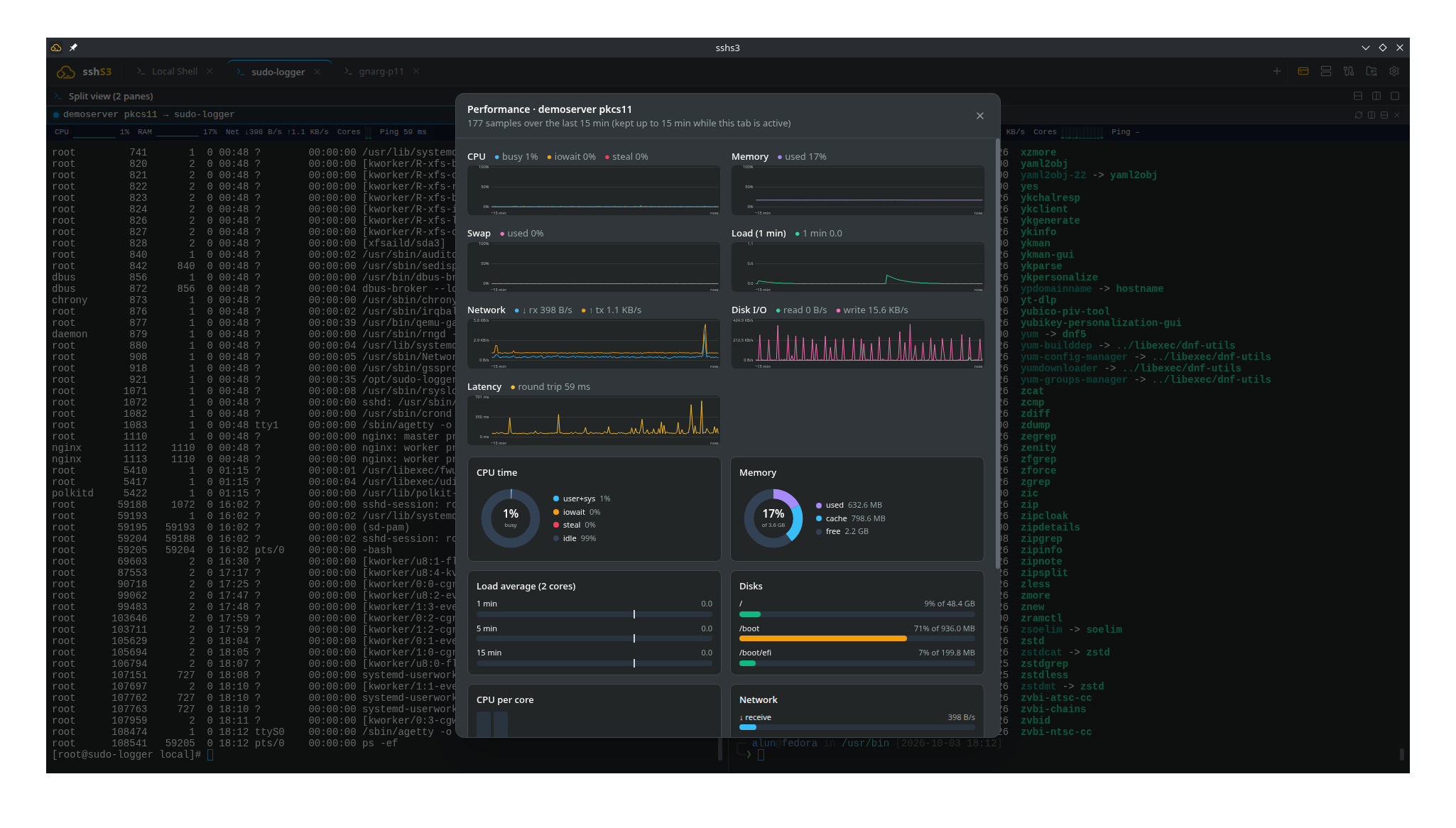
The Performance Bar in sshs3 is a compact, real-time telemetry strip positioned directly above terminal sessions. It provides continuous visibility into remote host health and resource saturation without requiring sysadmins to open a second window to run top, htop, or vmstat.

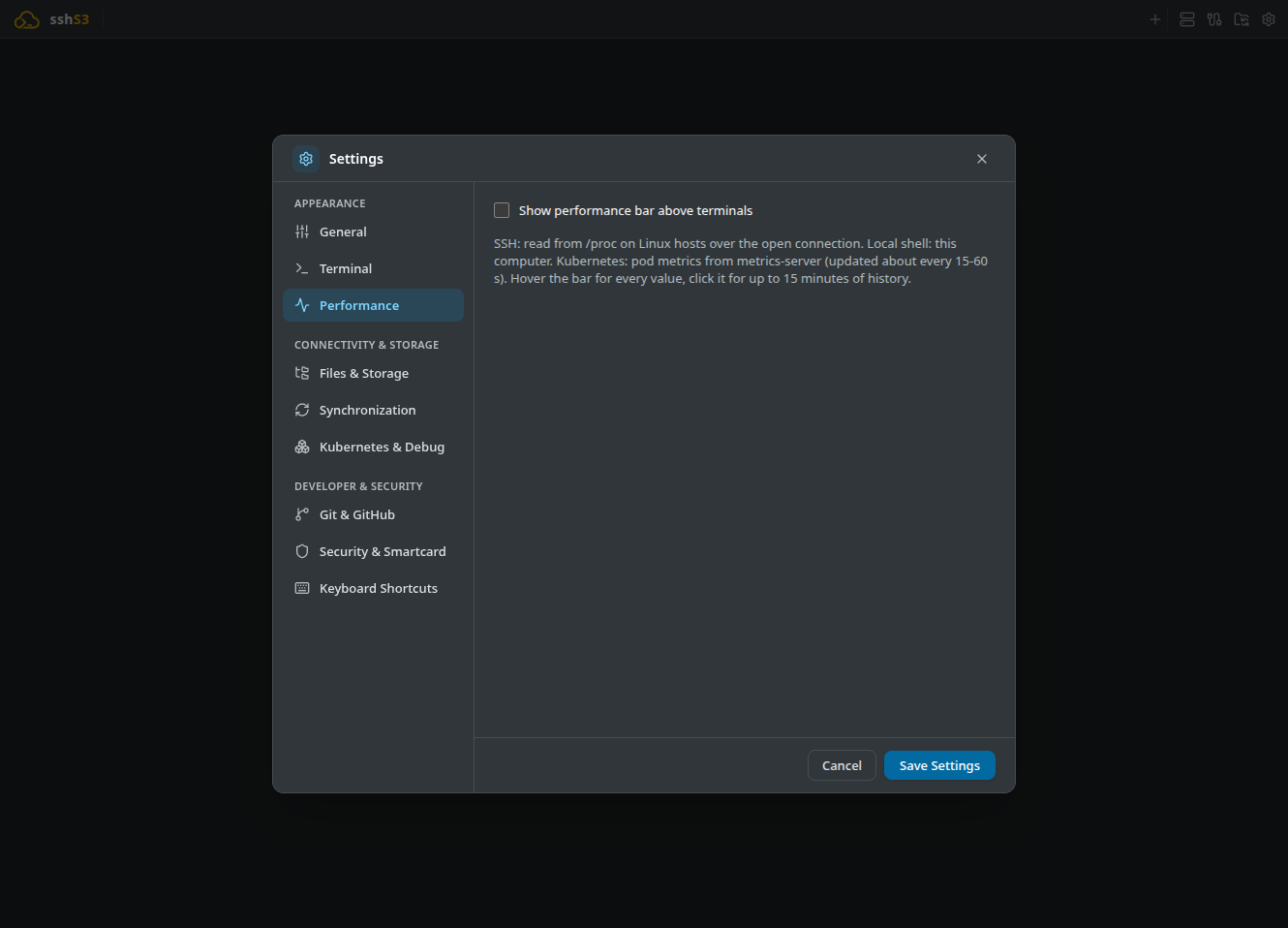
Strict Opt-In for Zero Resource Overhead: The performance bar is disabled by default (Settings → Performance). While disabled, zero polling loops run, zero background commands execute, and zero network traffic is generated.
1. Agentless SSH Telemetry via ControlMaster & /proc
Unlike traditional monitoring agents (Datadog, Prometheus node_exporter, Zabbix), sshs3 requires zero software installation on target servers.
Telemetry Modes & Visual Styles
- Open Settings → Performance and tick Show performance bar above terminals.
- Select your preferred display mode:
- Compact text: Minimalist text readouts (e.g. CPU: 14% | RAM: 3.8/16 GB | Load: 0.42 | Ping: 8ms). - Bars: Color-coded progress bars that dynamically transition from green to amber and red as thresholds are approached. - Sparklines: Real-time mini line charts graphing recent 60-second trends.
- Hover Tooltip: Hovering over the telemetry bar opens a comprehensive HUD listing all available metrics, including secondary metrics omitted from the compact bar.
- Historical Modal: Clicking the bar opens the 15-minute diagnostic view with interactive time-series graphs and breakdown donuts for CPU states (user, system, iowait, steal) and memory buffers.
Technical Architecture: Non-Invasive ControlMaster Multiplexing
Sampling executes over the already open OpenSSH ControlMaster socket used by the active terminal:
- No Extra Touch Prompts: The command strictly passes
-o BatchMode=yes, guaranteeing that background samples never trigger password prompts, smartcard PIN dialogs, or YubiKey touch requests. - Fixed Read-Only Script: Each sample runs a hardcoded, read-only script reading
/proc/stat,/proc/loadavg,/proc/meminfo,/proc/net/dev,/proc/uptime,/proc/diskstats, anddf -Pk. User inputs are never interpolated. - Safety Timeout: Samples time out after 4 seconds (12 seconds on Windows fallback) so high-load or unresponsive hosts never stall the terminal.
Good to know
- SSH telemetry needs a Linux server with a mounted
/procfilesystem (RHEL, Debian, Ubuntu, Rocky, Alpine, Arch and similar). Non-Linux hosts such as FreeBSD, OpenBSD or AIX are not supported. - Windows: OpenSSH has no
ControlMaster, so every sample is a short-lived non-interactive connection and the interval is at least 10 seconds. It only works for sessions that need no interaction per login: not FIDO2, not a smartcard without a cached agent, and not a password that is not saved.
2. Kubernetes Pod Telemetry (metrics.k8s.io)
When connected to a container exec terminal, the performance bar automatically switches into Kubernetes container telemetry mode:
- Requests & Limits: Visualizes real-time container CPU and memory usage against the pod's configured Resource Requests and Limits, alerting against imminent OOMKilled evictions or CPU throttling.
- Container Health: Displays restart counts, container age, node placement, and pod Ready condition.
Architecture: How Kubernetes Metrics Are Queried
An authenticated HTTPS request is dispatched directly to the Kubernetes API server:
GET /apis/metrics.k8s.io/v1beta1/namespaces/{namespace}/pods/{pod-name}Requires the standard Kubernetes metrics-server to be active in the cluster; if it is missing, the bar shows "metrics-server not available". The Metrics API itself refreshes every 15–60 seconds, and sshs3 polls at most once every 10 seconds to minimize load on cluster API controllers.
3. Telemetry Metrics Reference
| Metric | Source / API | Operational Diagnosis |
|---|---|---|
| CPU Total & Per Core | /proc/stat | Percentage utilization across total and individual logical CPU cores. |
| RAM & Page Cache | /proc/meminfo | Application memory allocation vs OS page cache (Buffers/Cached). |
| Load (1m / 5m / 15m) | /proc/loadavg | System run-queue saturation relative to total CPU core count. |
I/O Wait (iowait) | /proc/stat | CPU cycles blocked waiting on storage disk operations. |
CPU Steal (steal) | /proc/stat | CPU cycles taken by the hypervisor (detects noisy neighbors in VPS/cloud). |
| Disk Capacity | df -Pk | Percentage utilization across / and all mounted filesystems. |
| Network I/O (↓/↑) | /proc/net/dev | Real-time network throughput in bytes/s across network interfaces. |
| Disk Throughput | /proc/diskstats | Block device read/write throughput in MB/s. |
| Latency ("Ping") | Sample round trip | Time for the sampling command to complete over the open SSH connection. |
4. Troubleshooting & Diagnostics
| Symptom / Error | Probable Root Cause | Corrective Action |
|---|---|---|
| No metrics bar appears above terminal | Feature disabled in settings | Open Settings → Performance and tick Show performance bar above terminals. |
metrics-server not available | Kubernetes cluster lacks metrics-server | Deploy metrics-server: kubectl apply -f https://github.com/kubernetes-sigs/metrics-server/... |
Latency displays N/A | Round-trip could not be measured | Host may be temporarily unreachable or dropping keep-alive packets. |
| Metric updates freeze | Target host under extreme load | Sampler enforces a 4-second timeout. Updates resume automatically once the host responds. |