S3 Cloud & Object Storage
sshs3 provides a high-throughput, enterprise-grade cloud object storage client powered by the official AWS SDK v3 for JavaScript, integrated alongside your SSH servers and Kubernetes pods in the dual-pane file manager.
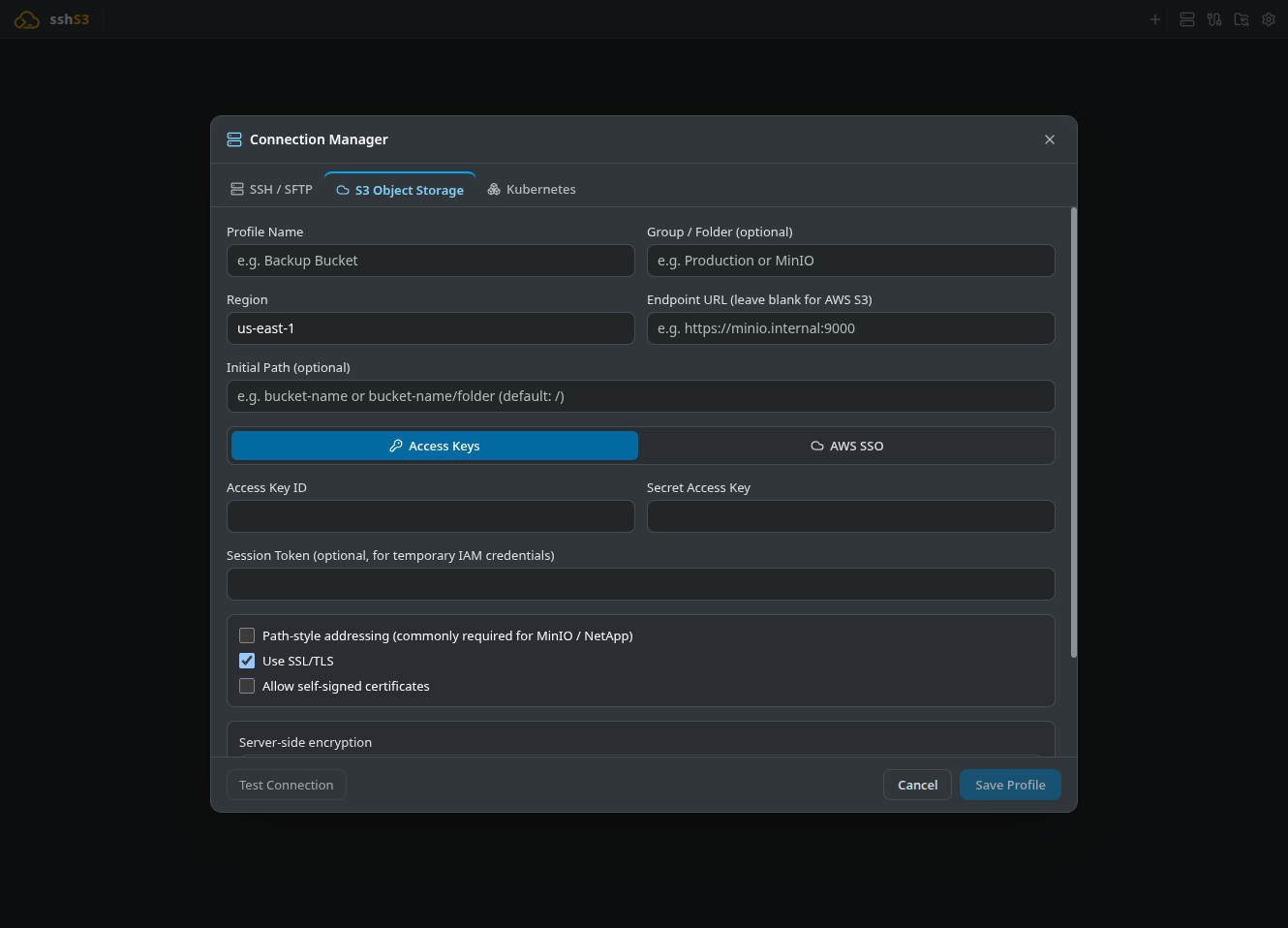
1. Supported Cloud Providers & S3 Compatibility
sshs3 provides native compatibility with all providers implementing the standard Amazon S3 REST API:
| Provider | Typical Endpoint Pattern | Path-Style Required? | Notes |
|---|---|---|---|
| Amazon Web Services (AWS) | https://s3.<region>.amazonaws.com | No (Virtual-Hosted) | All commercial regions, GovCloud, and AWS SSO OIDC. |
| Cloudflare R2 | https://<account-id>.r2.cloudflarestorage.com | No | Zero egress fees; standard S3 API tokens. |
| MinIO | http://127.0.0.1:9000 or custom FQDN | Yes | High-performance self-hosted on-premise clusters. |
| Wasabi Hot Cloud Storage | https://s3.<region>.wasabisys.com | Recommended | Cost-effective backup and archive storage. |
| Backblaze B2 & DigitalOcean | https://s3.<region>.backblazeb2.com | Optional | Compatible with standard S3 keys. |
| Ceph RGW & NetApp StorageGRID | Custom private FQDN / IP | Yes | Enterprise private cloud object fabrics. |
Path-Style Addressing for MinIO & IP Endpoints: When connecting to MinIO, private IP addresses, or internal Ceph endpoints, tick Path-style addressing (commonly required for MinIO / NetApp) in your profile. It forces requests formatted as endpoint/bucket/object rather than virtual-hosted subdomains (bucket.endpoint), avoiding DNS lookup failures on non-routable domains.
2. Authentication Strategies & AWS SSO
Configure your S3 profile using one of three authentication strategies:
A. AWS SSO / IAM Identity Center (Enterprise Zero Trust)
For organizations managing AWS accounts through corporate Single Sign-On:
- Provide your SSO Start URL (e.g.
https://my-org.awsapps.com/start) and SSO Region. - Click Sign in with AWS SSO. sshs3 initiates an OIDC device authorization and opens your default browser with an 8-character verification code.
- Once approved, sshs3 retrieves temporary STS session credentials and displays an interactive selector to choose your target AWS Account and IAM Role.
- AWS CLI Cache Reuse: In environments already running the AWS CLI, sshs3 automatically checks
~/.aws/sso/cache/, reusing valid tokens to eliminate redundant browser logins.
Technical Architecture: OIDC Device Code Exchange
AwsSsoAuthService (src/main/aws/AwsSsoAuthService.ts) coordinates @aws-sdk/client-sso-oidc (StartDeviceAuthorizationCommand), polls the device token endpoint, and exchanges approved grants for temporary STS role credentials via @aws-sdk/client-sso (GetRoleCredentialsCommand). Long-lived IAM access keys are completely eliminated from the workstation.
B. Static IAM Credentials (Access Key & Secret Key)
- Traditional authentication with Access Key ID and Secret Access Key.
- Secrets are encrypted securely at rest using your operating system's native keyring (
safeStorage). - Supports optional Session Token parameters for temporary STS credentials.
C. Security & Encryption Options
- Server-Side Encryption: Configure objects to encrypt automatically at rest with SSE-S3 (AES-256) or SSE-KMS (with custom KMS Key ID).
- Use SSL/TLS: Encrypts S3 traffic with HTTPS. Turn it off only for local development such as
http://localhost:9000. - Self-Signed Certificates: Toggle Allow self-signed certificates for private MinIO instances in testing environments.
Good to Know & Limitations: Authentication & AWS SSO Lifetimes
- Interactive Browser Required: AWS SSO device code authentication requires access to your organization's corporate IAM Identity Center login portal via a desktop web browser.
- STS Token Expiration: Temporary session credentials issued by AWS SSO/STS expire automatically according to your organization's session policies (typically 8–12 hours). When expired, click Sign in with AWS SSO to refresh the token.
3. Presigned URLs for Ephemeral File Sharing
Share large files (database dumps, application logs, build artifacts) from completely private S3 buckets with colleagues or customers without changing bucket policies or creating IAM accounts:
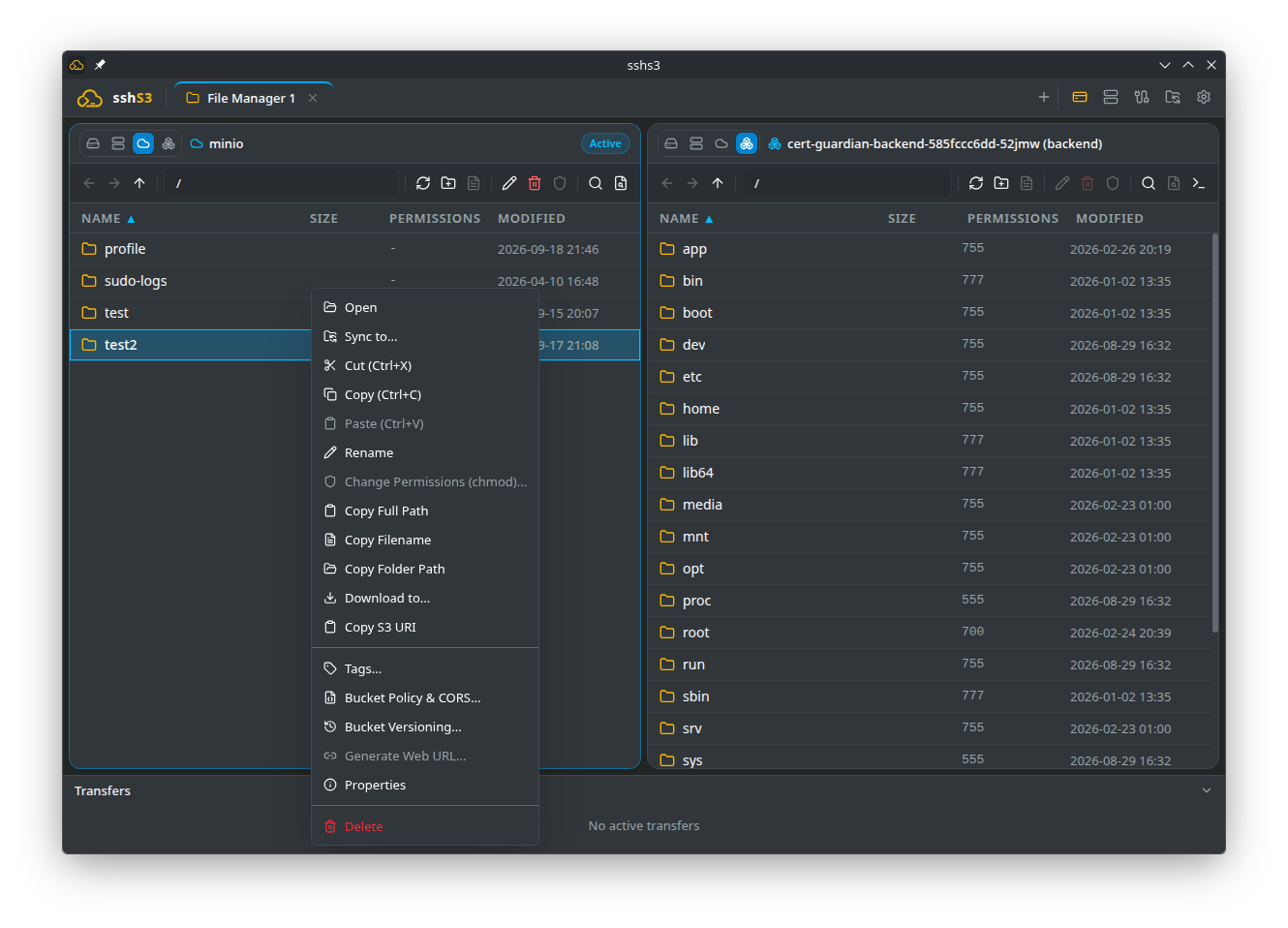
- Right-click any object in the S3 pane and select Generate Web URL....
- Select your link expiration: 15 minutes, 1 hour, 12 hours, 1 day, or 7 days (maximum).
- Click Copy link. The URL can be downloaded via browser,
curl, orwgetanywhere on the internet.
Security Architecture: How SigV4 Presigned URL Signatures Work
Generated via @aws-sdk/s3-request-presigner (getSignedUrl) using GetObjectCommand. An AWS Signature Version 4 (SigV4) SHA-256 HMAC hash is generated incorporating your credentials, bucket, object key, and expiration timestamp, serialized into query parameters (X-Amz-Signature). If generated using temporary AWS SSO/STS credentials, maximum lifespan is capped by the remaining lifetime of the STS token.
Good to Know & Limitations: Presigned URL Lifespans
- 7-Day Protocol Ceiling: Under AWS Signature Version 4 (SigV4), the hard protocol ceiling for presigned URLs generated with static IAM access keys is 7 days (604,800 seconds).
- Temporary STS Lifetime Cap: When presigned URLs are generated while logged in with temporary AWS SSO or STS credentials, AWS caps the link's expiration to the remaining lifetime of the STS token (often 1–12 hours), regardless of the expiration selected in the dialog.
4. Object Versioning & Historical Rollback
Protect critical cloud objects against accidental overwrites or malicious deletions:
- Inspect Version Tree: Right-click an object in a versioned bucket and select Object Versions... to view all historical revisions with Version IDs, sizes, and timestamps.
- Restore Historical Version: Click Restore as current version to reactivate a previous revision.
- Bucket Versioning Control: Enable or suspend versioning on the bucket directly via Bucket Versioning....
Good to Know & Limitations: Versioning & Storage Costs
- Bucket-Level Setting: Object versioning must be enabled on the bucket at the cloud provider level.
- Accumulated Storage Costs: Storing multiple versions of large objects accumulates cloud storage charges. Configure S3 Lifecycle rules at your provider to transition or expire non-current versions after a retention period.
5. Bucket Administration, CORS & Cloud Tags
Manage cloud storage policies without opening the AWS or cloud provider web console:
- Bucket Policy & CORS: Inspect and edit JSON bucket access policies and Cross-Origin Resource Sharing (CORS) rules (allowed origins, HTTP verbs, max-age).
- Cloud Tags: View and assign key-value metadata tags on buckets and individual objects for cloud billing attribution.
Good to Know & Limitations: IAM Administration Permissions
- Elevated Permissions Required: Viewing and updating bucket policies, CORS rules, and bucket versioning requires administrative IAM capabilities (
s3:GetBucketPolicy,s3:PutBucketPolicy,s3:GetBucketCORS,s3:PutBucketCORS,s3:PutBucketVersioning). Users with read-only bucket permissions will receiveAccessDeniederrors when opening administrative modals.
6. Troubleshooting & Diagnostics
| Symptom / Error | Probable Root Cause | Corrective Action |
|---|---|---|
ENOTFOUND <bucket>.192.168.1.50 | Virtual-hosted addressing used against an IP address | Tick Path-style addressing in your S3 connection profile. |
SignatureDoesNotMatch | Invalid Secret Key or workstation clock skew | Verify credentials. Synchronize system clock via NTP (SigV4 allows max 15m skew). |
AccessDenied (403 Forbidden) | IAM policy lacks required S3 verbs | Ensure IAM policy grants s3:ListBucket, s3:GetObject, and s3:PutObject. |
| Presigned URL expires after 1 hour | Generated using short-lived AWS SSO/STS credentials | For 7-day links, use a profile configured with static IAM credentials. |