Security, Hardware Keys & Smartcards
Security, Hardware Keys & Smartcards
Security and cryptographic isolation form the foundation of sshs3. The application is designed around the principles of Zero Private Key Extraction, strict memory sandboxing, and Zero Trust authentication.
1. Zero Private Key Extraction Architecture
A critical distinction between sshs3 and other commercial clients is that private cryptographic keys are never extracted, loaded, or exposed inside JavaScript, Node.js, or Chromium memory:
- FIDO2 / WebAuthn Keys (YubiKey 5 / Security Key):
All cryptographic signing operations execute directly on the hardware security chip. Private keys physically cannot be exported by software.
- Smartcards (PKCS#11 / SITHS / PIV / CAC):
Keys reside inside the tamper-resistant Secure Element of the physical card. Signing requests are delegated via system PKCS#11 modules (p11-kit, opensc, libykcs11).
- Software Keys on Disk (
id_ed25519,id_rsa):
Loaded and read exclusively by your operating system's native ssh binary. sshs3 never parses, reads, or stores your private key bytes in application memory.
2. Visual Touch-Presence Banner
Authenticating with a FIDO2 hardware token (ed25519-sk, ecdsa-sk) requires physical user presence:
┌────────────────────────────────────────────────────────────────────────┐
│ 🔑 Touch your security key to authenticate...                          │
└────────────────────────────────────────────────────────────────────────┘
Feature: Real-Time Hardware Interaction Notification
🎯 Purpose
In standard command-line terminals, connections often appear to hang while the user is unaware that a YubiKey is blinking under their desk. sshs3 surfaces an animated visual banner the exact millisecond user presence is requested.
🛠️ How to Use
When authenticating via a FIDO2 key, an animated gold banner illuminates at the top of the workspace: "Touch your security key to authenticate...". Tap the hardware token to complete the handshake.
⚠️ Limitations & Caveats
- If the token is not touched within OpenSSH's timeout window (typically 30 seconds), the connection aborts.
- Requires OS-level FIDO2/U2F driver support.
⚙️ Technical Internals & Architecture
SSHPtyManager and OpenSshSftpProcess inspect process stderr in real time for OpenSSH prompt markers: Confirm user presence for key... Upon detection, an IPC_CHANNELS.PRESENCE_PROMPT (presence:prompt) event dispatches to React to mount the banner. As soon as the touch completes or the operation finishes, an IPC_CHANNELS.PRESENCE_CLEAR (presence:clear) event dismisses the banner automatically.
3. Ephemeral PIN Caching Strategies & AppAgent
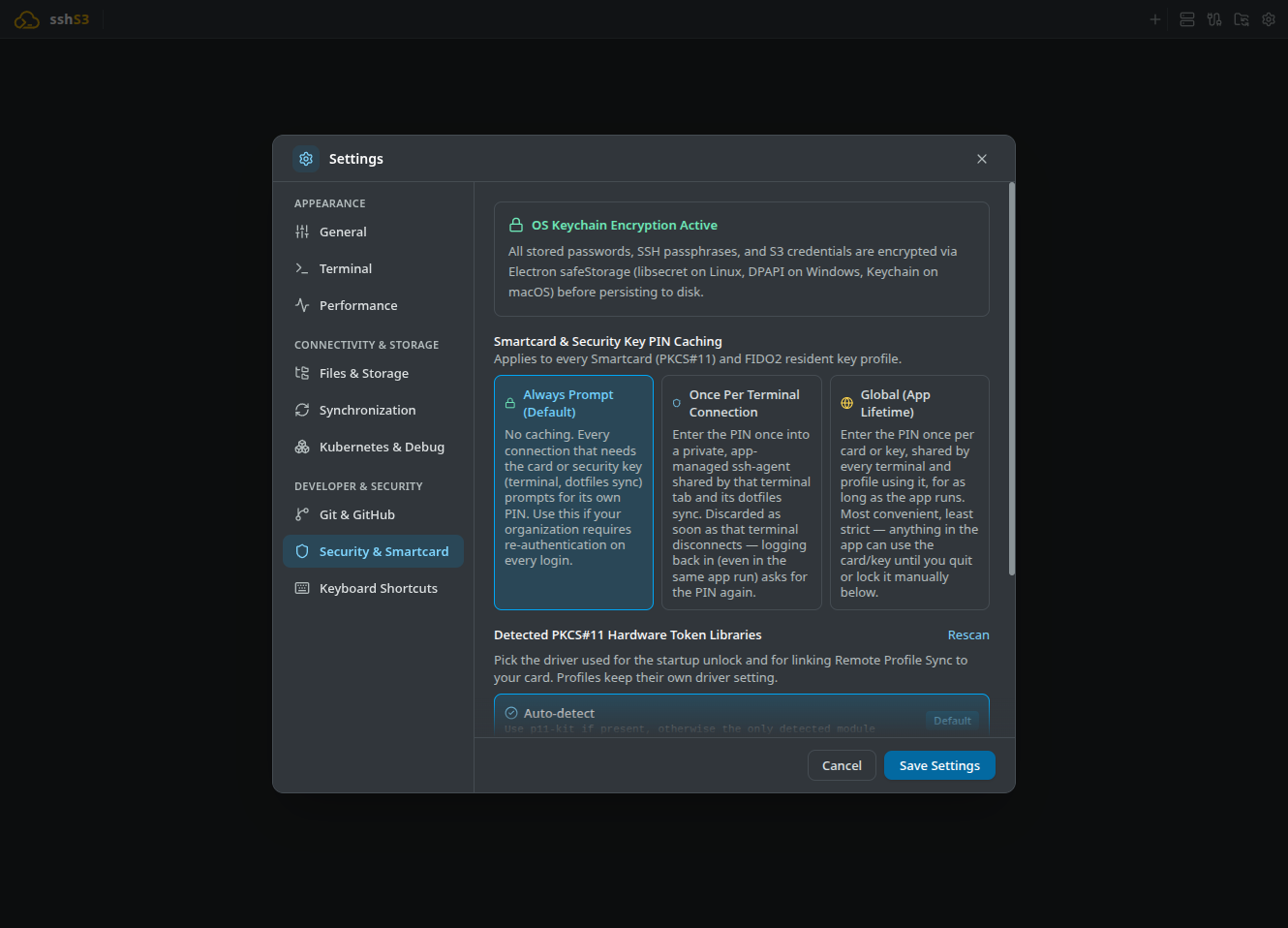
To protect smartcards and PIN-protected hardware keys against unauthorized physical access while preventing user fatigue, sshs3 provides three distinct policies under Settings → Security & Smartcard:
A. Always Prompt (Default / Maximum Security)
- Behavior: No caching across connections. Prompts for your smartcard PIN via a modal dialog for every new SSH or SFTP connection; reconnecting asks for the PIN again. Use this where policy requires re-authenticating the card on every single login.
- Memory: The PIN is wiped from memory the instant the cryptographic handshake completes.
B. Once Per Terminal Connection
- Behavior: The PIN is entered once into a private, app-managed
ssh-agentshared by that terminal tab and its dotfiles sync. - Lifecycle: The agent process is killed when the terminal disconnects, and reconnecting asks again. Automatic reconnects after a dropped connection reuse the open agent while active.
C. Global (App Lifetime) — Full SSO for Terminal & External CLI
- Single App-Wide Agent (
AppAgent): All unlocked smartcards and FIDO2 keys reside in one app-widessh-agenton a stable socket ($XDG_RUNTIME_DIR/sshs3/agent.sock, or/sshs3- /agent.sock XDG_RUNTIME_DIRis not set; the directory is created with0700and refused if it is not owned by you or is accessible to others). - Dynamic Lock/Unlock Toggle: A smartcard icon in the top toolbar indicates cached status and features an interactive toggle:
- Lock All Now: Prompts the agent to flush all loaded cryptographic keys immediately (ssh-add -D) without terminating or changing the socket. - Unlock Now: Prompts for your PIN to reload keys back into the agent without restarting the application.
- FIDO2 PIN and touch: A FIDO2 key created with Require PIN + touch on every use asks for its PIN and a touch on every signature. The PIN you enter when unlocking is kept in memory only (never on disk) and reused for those signatures until you lock, so connecting asks only for the touch. It is cleared on Lock All Now, on quit and if the agent restarts, and it is never replayed twice in a row: if the key asks again right away (the PIN was wrong or changed) you are asked instead, so a wrong PIN cannot use up the authenticator's retries.
- Card Isolation & Touch Protection (
IdentitiesOnly): When sshs3 connects to a server using the agent, it locks the session strictly to that specific profile's card (IdentitiesOnlyplus public key file). Remote servers never see other loaded keys, and FIDO2 security keys do not receive spurious touch requests! - Cards with several certificates (authentication vs. signing): A PIV card often holds more than one certificate, for example an authentication certificate (slot 9A) and a signing certificate (slot 9C). The PKCS#11 loader (
ssh-add -s) loads every key the card exposes, so sshs3 reads the card's certificates first (public objects, no PIN) and only uses the ones meant for authentication:
- A certificate counts as an authentication certificate when its Key Usage includes digitalSignature and, if it has an Extended Key Usage, that includes clientAuth, smartcard logon or any purpose. A certificate that also sets nonRepudiation (the usual PIV signing certificate) needs such an Extended Key Usage to count. A certificate without these extensions is treated as an authentication certificate. - Only those keys are listed in the cached smartcard identities menu and pinned to your profiles with IdentitiesOnly, so signing and key-management keys are never offered to a server. Right after the card is unlocked, the other keys are also removed from the app agent (Linux and macOS; best effort), so a plain ssh in another terminal does not offer them either. - If no certificate on the card looks like an authentication certificate, or the certificates cannot be read, all keys are kept, as before. The key linked for smartcard sync is never removed. - Limits: this applies to Global (App Lifetime) caching only; on Windows the agent is the shared OpenSSH service and nothing is removed from it.
- Local Shells & External CLI Superpower: Local shell tabs automatically receive this stable socket via
SSH_AUTH_SOCK. Because the socket path is stable, shells opened before unlocking a card immediately work once unlocked! Furthermore, sshs3 injects a temporary local-only block into your~/.ssh/config:
# BEGIN sshs3-agent (temporary local-only, managed by sshs3)
Host *
  IdentityAgent /tmp/sshs3-agent-1000/agent.sock
# END sshs3-agent
This ensures that external command-line terminals, IDEs (VS Code), and automated scripts outside sshs3 can immediately use your unlocked smartcard without prompting for a PIN! When sshs3 exits, the block is cleanly removed and the socket destroyed. The agent block is refreshed after every profile config sync in serialized order with hardened marker parsing.
Feature: Ephemeral PIN Delivery via AskpassServer
🎯 Purpose
Deliver seamless Single Sign-On across complex server topologies without ever writing PIN codes to disk or plaintext files.
🛠️ How to Use
Select your preferred policy under Settings → Security & Smartcard. Enter your PIN in the secure dialog when prompted.
⚠️ Limitations & Caveats
- If the application crashes unexpectedly, stale sockets are cleaned up automatically on the next launch.
- PIN caching is strictly memory-only and is wiped upon reboot or application exit.
⚙️ Technical Internals & Architecture
AskpassServer (src/main/smartcard/AskpassServer.ts) establishes an isolated Unix domain socket with strict 0700 permissions. OpenSSH is launched with SSH_ASKPASS_REQUIRE=force, pointing SSH_ASKPASS to the app binary running in node mode (ELECTRON_RUN_AS_NODE=1). Communication is isolated from other users on multi-tenant workstations.
4. Troubleshooting & Diagnostics Runbook
| Symptom / Error Message | Probable Root Cause | Corrective Action |
|---|---|---|
Smartcard module not found | PKCS#11 library package missing in operating system | Install p11-kit (sudo apt install p11-kit or sudo dnf install p11-kit). |
PIN locked / CKR_PIN_LOCKED | Incorrect PIN entered too many times | Card is locked. Unlock using your PUK code via your card provider's utility (e.g. Net iD Client). |
| Touch banner does not disappear | OpenSSH timeout occurred or missed signal | Touch the YubiKey immediately when it flashes. Verify the key is securely seated in USB. |
| Login asks for PIN despite Global Caching | The local tab was opened before PIN caching was switched to Global (a shell's environment is fixed when it starts), or Settings → Terminal → Local Terminal SSH Agent is System Only / Disabled | Open a fresh tab, and keep Local Terminal SSH Agent on Auto so the tab receives the AppAgent socket. |